Project
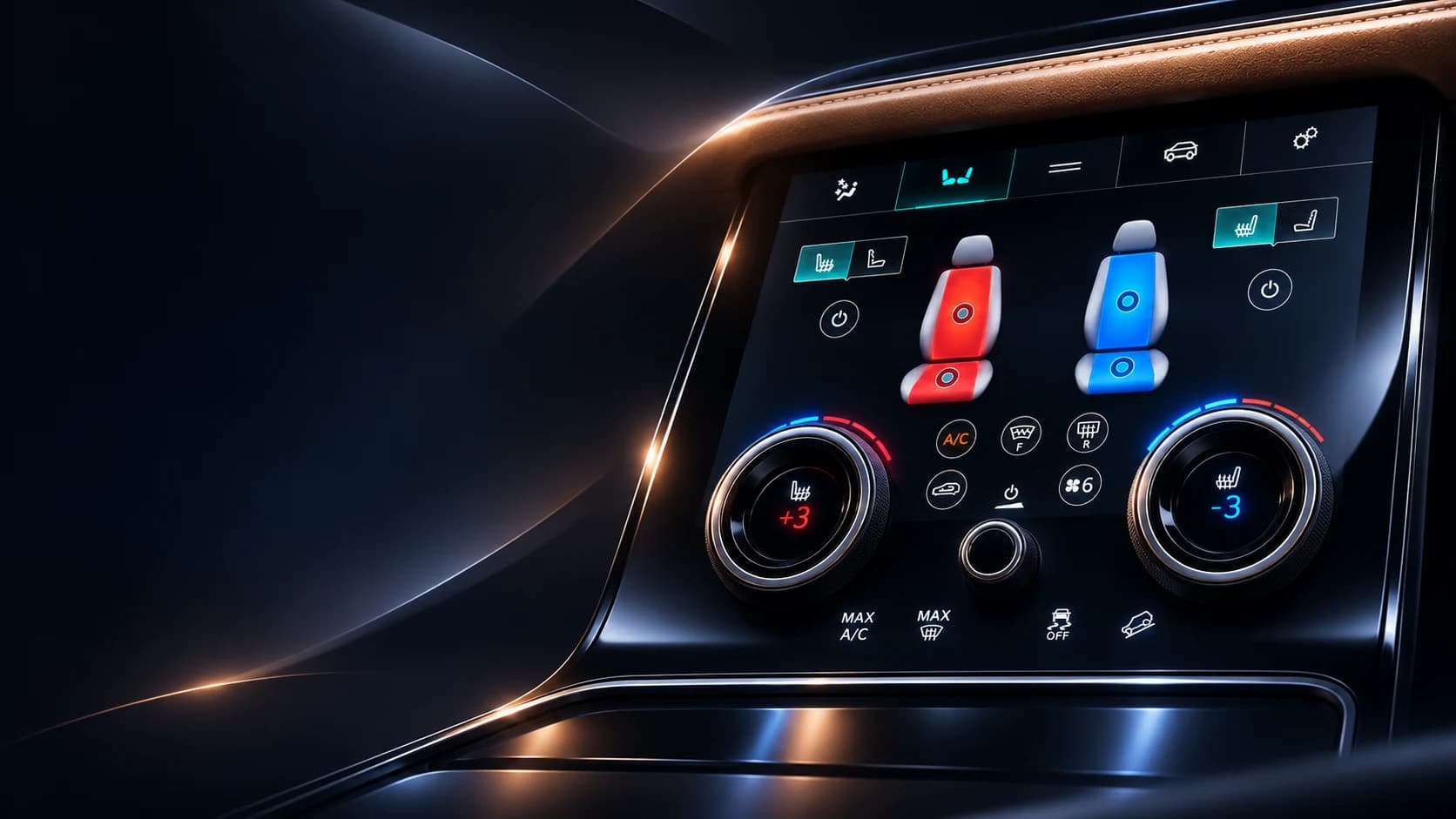
Range Rover Lower Touch Screen
Climate, seating, and comfort controls shaped for quick recognition and confident use.
- Role
- HMI concept · Interaction design
- Stack
- Javascript · CSS · Grunt · Websocket · Git
- Period
- 2018
- Outcome
- Glanceable comfort
Overview
Everyday controls, within easy reach.
Interface concept. Range Rover Lower Touch HMI is an exploratory lower-screen direction, not a production interface or an official Jaguar Land Rover project. The imagery is conceptual, and no usability or safety results are claimed.
The problem
A lower console display brings climate, seating, and vehicle-comfort controls into one surface. That convenience can also create a dense interface where frequently used actions become difficult to locate without looking away for too long.
This concept explores a calmer hierarchy for those controls. Driver and passenger zones remain visually distinct, the current seat state is visible at a glance, and related actions stay close to the physical rotary controls beneath the display.
Role and constraints
The concept covers visual hierarchy, interaction states, and a set of key comfort screens for the lower HMI.
- Driver and passenger controls need clearly separated zones.
- Heating, cooling, massage, and power states must be identifiable without relying on color alone.
- Common climate actions should remain available without opening a deep menu.
- The layout must account for touch use, quick glances, and the adjacent physical dials.
Information architecture and decisions
The upper navigation keeps Climate, Seats, Vehicle, and Settings in consistent positions. The active section uses both a highlighted surface and a label, while the central seat illustrations make the selected zone and intensity visible before a user reaches for a secondary control.
The concept treats the two rotary controls as part of the interface rather than decoration. Screen content aligns with their positions so that temperature or seat-comfort feedback has a stable visual anchor. Secondary functions such as massage patterns open in a compact panel without displacing the primary seat zones.
Interaction and accessibility
Selected controls use shape, outline, text, and icon changes in addition to turquoise, red, or blue accents. Power states remain explicit, and the two seat zones keep the same spatial relationship across the explored screens.
A production version would need validation in the installed viewing angle, reach envelope, and lighting conditions. Touch-target size, type scale, distraction time, haptic feedback, localization, and behavior while the vehicle is moving would all require testing with representative hardware.
Result and next steps
The result is a focused visual direction covering dual-zone seat climate, massage modes, and seat ventilation. It shows how the lower screen and physical controls could read as one coordinated system.
The next step would be a task-based prototype tested in a representative center console. The study should measure whether people can recognize the active zone, change a common setting, and return to the primary screen without losing context.
Lessons to carry forward
An in-vehicle interface benefits from restraint. Consistent zones, persistent state, and a short path to frequent actions matter more than fitting every available feature onto the first screen.
Visual showcase
Results
- 2
- Independent seat zones
- <2s
- Common-action target
- 5
- Massage modes explored
- AA
- Contrast target
Let's talk
Let's build something.
Have a project in mind or just want to say hello? I'm always up for a good conversation.
Let's talk